When you are in an employee's deduction, and enter data in the Note field, you can choose whether the note will appear in just this current pay period, or if you want it to repeat for future payrolls.
Setting the Notes on Individual Employee's Deductions:
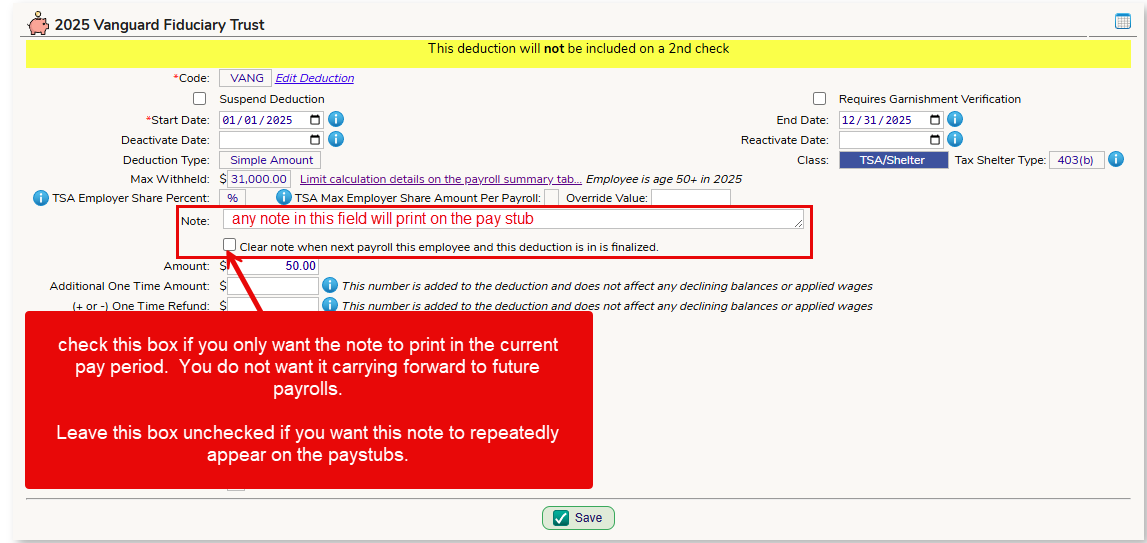
Checking the checkbox - after the current pay period is finalized, the note will clear.
NOT checking the checkbox - the note will continuously carry forward to future payrolls until you turn it off (check the box).
Globally Setting the Deduction Notes Feature:
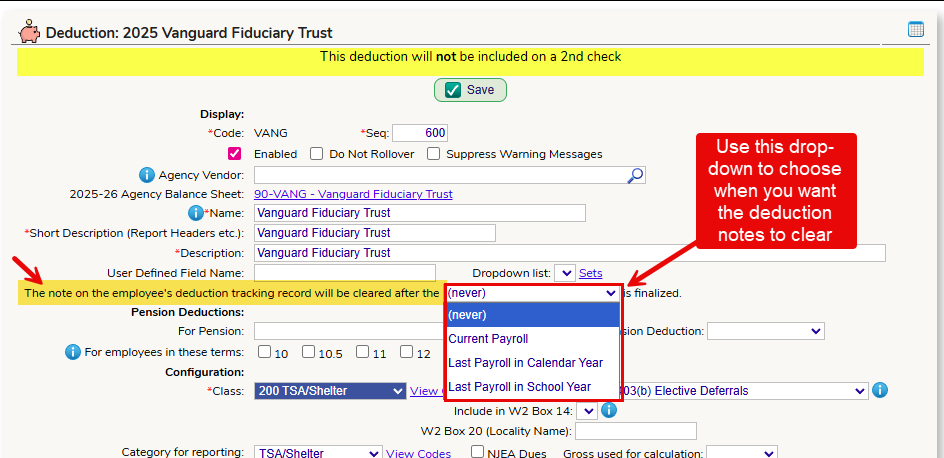
Go to the Payroll > Setup > Deductions screen and click on the Edit button for the deduction. Using the drop-down shown below, you can choose when ALL notes on ALL employees who have this deduction are cleared.
- never - the notes will stay "forever" and the system will never clear them (you can still clear an individual's note by following the instructions above)
- Current Payroll - any notes entered for this deduction for all employees will clear automatically when the current payroll is finalized
- Last Payroll in Calendar Year - any notes in this deduction for all employees will clear after the last payroll in the calendar year is finalized
- Last Payroll in School Year - any notes in this deduction for all employees will clear after the last payroll in the school year is finalized
Was this article helpful?
That’s Great!
Thank you for your feedback
Sorry! We couldn't be helpful
Thank you for your feedback
Feedback sent
We appreciate your effort and will try to fix the article