Instructions for completing the template:
Expected file format:
- Excel File
- Columns may appear in any order
- First row must contain the column names as described below
- All required columns MUST appear in the file. Other columns are optional.
- Columns are not case sensitive. Description is the same as DESCRIPTION.
- Existing staff are located by Staff Id or SSN
- New staff notes are created.
- Existing staff notes are never deleted.
- Existing data for that field is untouched if a value is blank or the column is not in the import file.
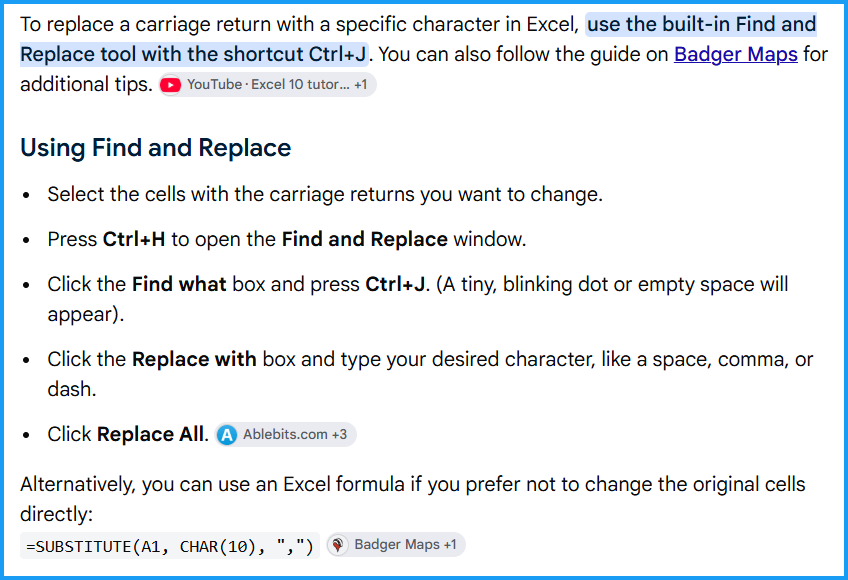
- Carriage-returns should be removed or replaced with a character (like ":" ) Please see picture below for a helpful tip on this from Google.
Details for data in the template:
| Column | Sample Data | Required? | Notes |
| Staff Id | 1000 | YES | Staff Id field or SSN field is required. |
| SSN | 123-45-6789 | YES | Staff Id field or SSN field is required, Must be in the format '###-##-####'. |
| Last Name | Doe | No | |
| First Name | John | No | |
| Category | GENERAL | No | See Setup->Codes->Note Categories for options and creation of Category. Use the Category CODE in the template. |
| Notes | This is an example note. | YES | Enter the Text of the note. The imported note WILL NOT honor carriage-returns, tab, or other spacing. |
Was this article helpful?
That’s Great!
Thank you for your feedback
Sorry! We couldn't be helpful
Thank you for your feedback
Feedback sent
We appreciate your effort and will try to fix the article